Human programmer+ Sidecar
In development · running on production lines

PLCSidecar

The AI sidecar for TIA Portal.

Any AI model reads and edits your PLC software through TIA Openness. You review and approve every change.

// Built by a PLC programmer, for PLC programmers.

"AI"edits SCL / LAD / HMI "Engineer"diff · version · approval "PLC_Sidecar" FB OpennessENENO API V17–V21export · import · XML/SCL "TIA_Portal"import · compile 0/0
01

AI proposes.

Any model reads the project and drafts the change: SCL, LAD, an HMI screen or a watch table.

02

You approve.

A version first, then a before and after review. Nothing reaches a production project without your confirmation.

03

Openness imports.

Only through the official Siemens interface. No hacks, no shortcuts.

04

TIA compiles. 0 errors.

The whole PLC is compiled and the project saved. You download to the PLC when you are ready.

All languages

Every language your PLC speaks.

Text or graphics, the AI works in the language of the block and PLC Sidecar carries it into TIA Portal and back.

SCLStructured Control Language with regions, diff and historySTLStatement List, still alive in many plantsLADladder networks, contacts, coils, boxesFBDfunction block diagram with a box editorGRAPHsequencers via SimaticML round-tripDB · UDTdata blocks and PLC data typesTags · VATPLC tag tables and watch tablesHMIscreens, HMI tags and text lists

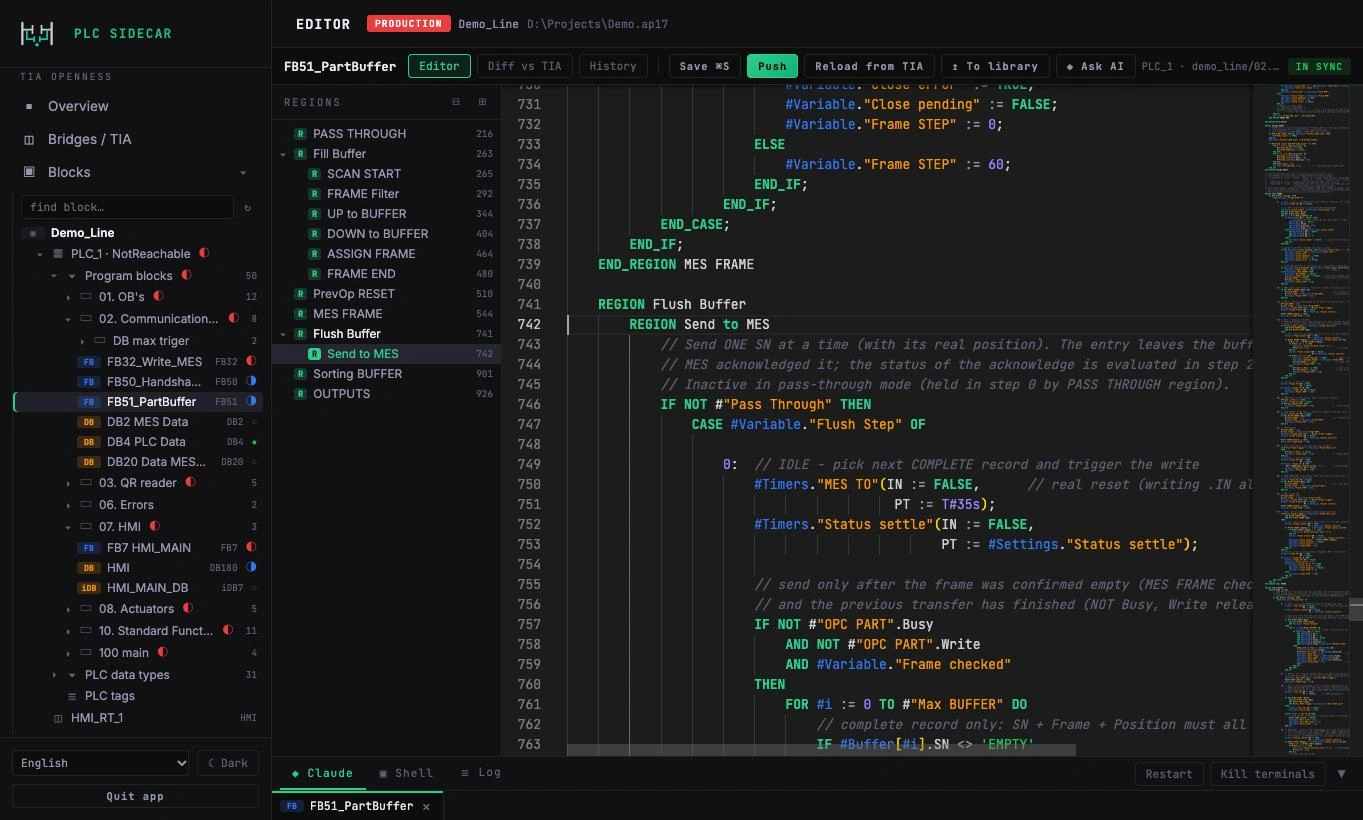
Your project. Every block.

The full program tree, regions, search and history right next to the code.

PLC Sidecar
Your project. Every block.
Multiplatform

Made for the Mac. At home on Windows.

PLC Sidecar runs natively on Apple silicon. TIA Portal stays in its Windows world: in Parallels Desktop on the same Mac, on a Windows PC or on a VM anywhere in your network. An encrypted tunnel connects the two.

PLC Sidecar · macOS Windows · Parallels Desktop TIA PortalV17–V21 · Openness Windows PC / VMTIA Portal encrypted tunnel
macOS · Apple siliconnative app on M-series Macs
Parallels DesktopTIA Portal in a Windows VM on the same Mac
WindowsTIA on a PC, a server or a remote VM
Anywhereone encrypted SSH tunnel, also over Tailscale
TIA Portal V17–V21one bridge per version, several projects at once
Automation built in

Every change goes through the same twelve steps.

Nobody has to remember the routine. PLC Sidecar runs it on every change, and the list keeps growing.

01Version before the changethe block is exported to git first, with a daily full export of the project
02Freshness checkstops when TIA Portal holds a newer version than the one the AI edited
03Compare with the PLCoptionally checks the project against the running PLC before a change
04Lint before importreserved words, String[n] in HMI tags and other traps caught before TIA sees them
05Importexternal source with the right encoding, or SimaticML for graphical blocks
06Compilethe block, then the whole PLC when blocks depend on each other
07Savethe project is saved right after the change
08TIA health checkverifies TIA Portal still runs after an import and reports a crash
09Callersan interface change lists every block that calls it
10Before and afterevery job keeps a record of what changed, line by line
11Version after the changethe result goes to git as well, ready for rollback
12TIA archivea .zap archive before a change or when you finish your edits
+ more with every release
Customer standards

Your style. The customer's standard.

Every integrator has a way of programming, and every customer has a standard. PLC Sidecar keeps a library per customer: blocks, naming, structure and rules. The AI writes code the way that project expects.

Your projects

Your own style: SCL step chains with symbolic steps, REGIONs, English comments, your standard function blocks.

Customer A

Classic Set/Reset sequences in LAD and the old block structure, kept exactly as the plant knows it.

Customer B

An automotive standard such as SICAR: fixed block layout, naming and HMI conventions.

Learns from projects

Take a block from a running project into the library with one click. Its conventions become rules the AI follows.

01

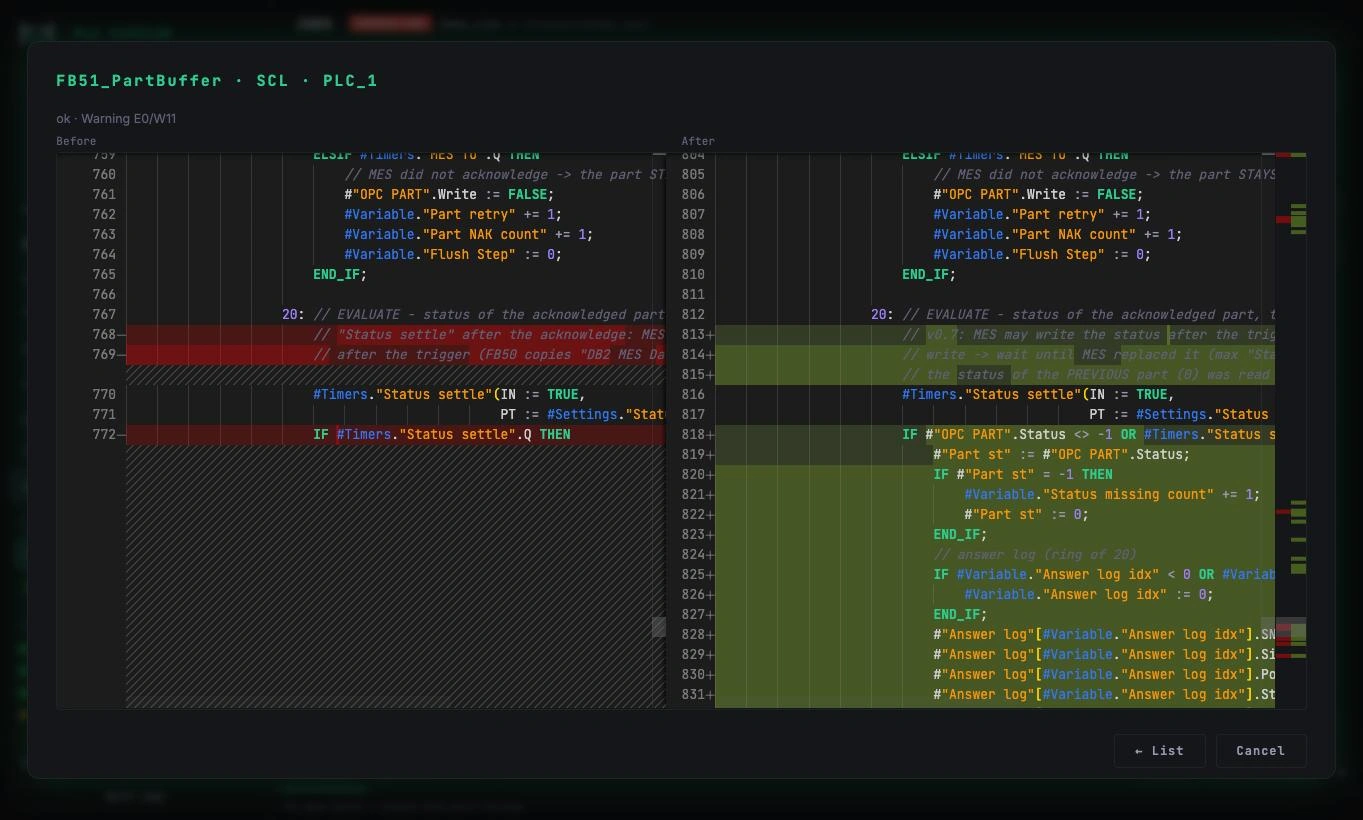
Every change, side by side.

Before and after for each block, straight from TIA Portal. You see exactly what the AI changed, line by line.
PLC Sidecar
Every change, side by side.
02

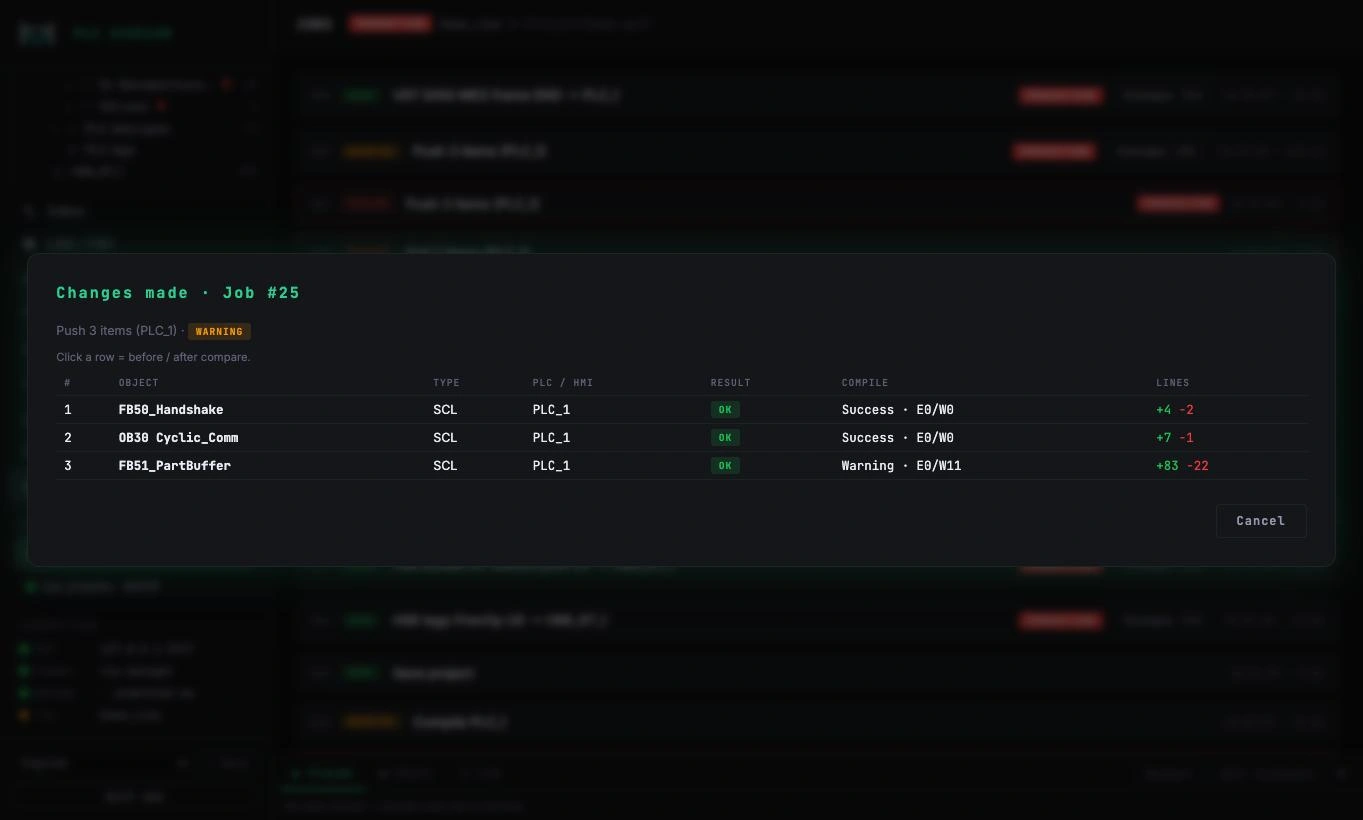
A clear record of what changed.

Each job lists the objects, compile results and lines changed. Nothing happens silently.
PLC Sidecar
A clear record of what changed.
03

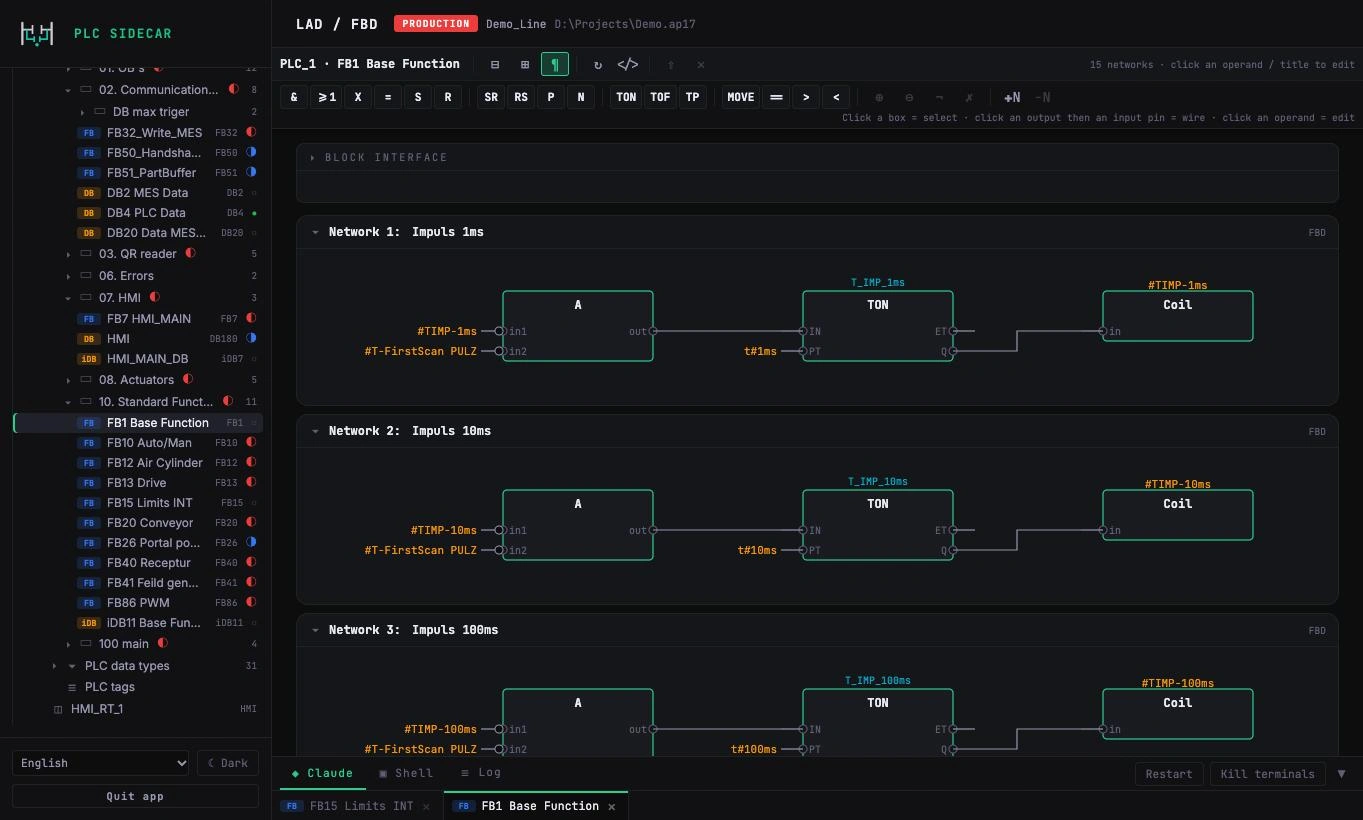
FBD, too.

Function block diagrams with boxes, inputs and outputs, rendered network by network.
PLC Sidecar
FBD, too.
04

HMI screens and tags.

Browse screens, inspect every object and its tag links, generate HMI tags from PLC data.
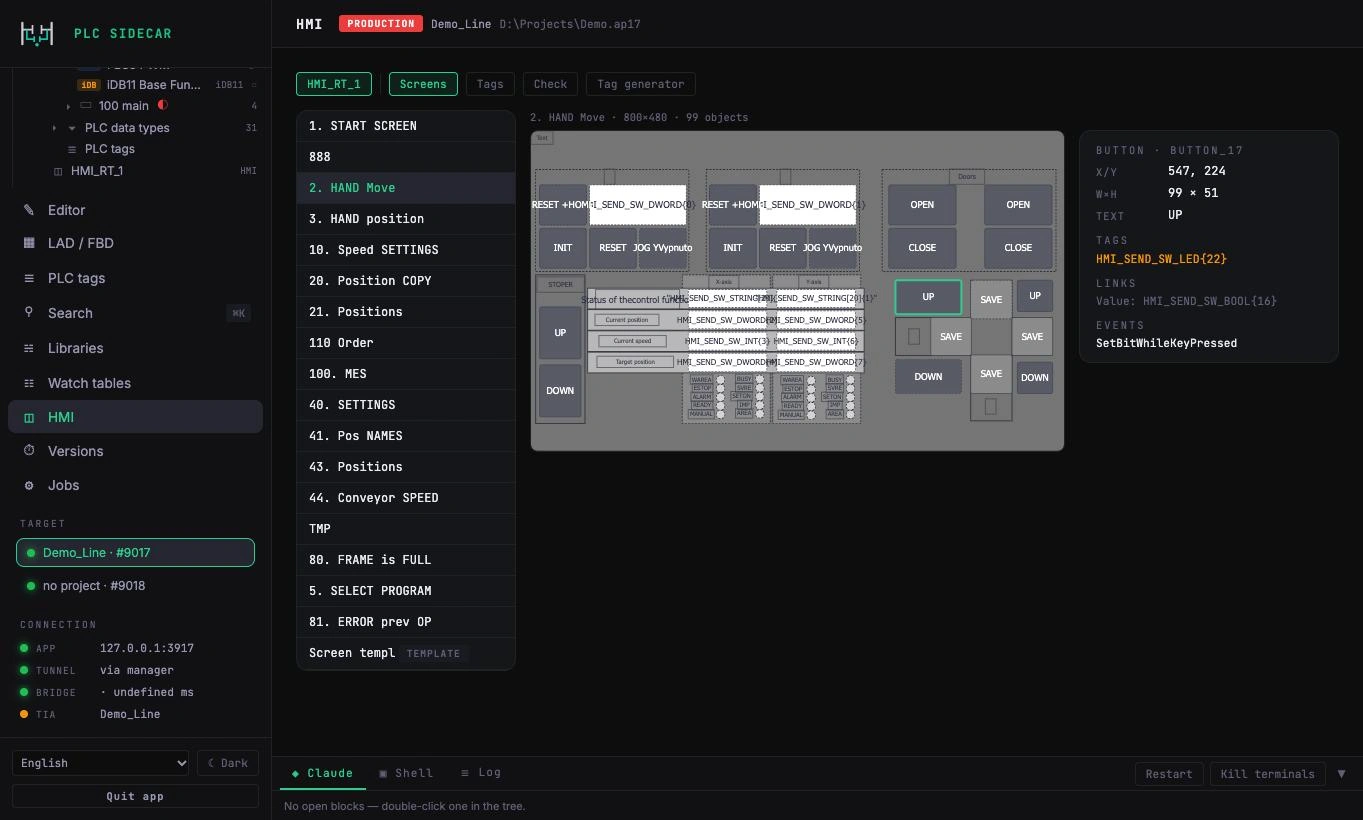
PLC Sidecar
HMI screens and tags.
05

Compile and save. Every time.

Every push compiles the whole PLC, saves the project and checks that TIA Portal is still alive.
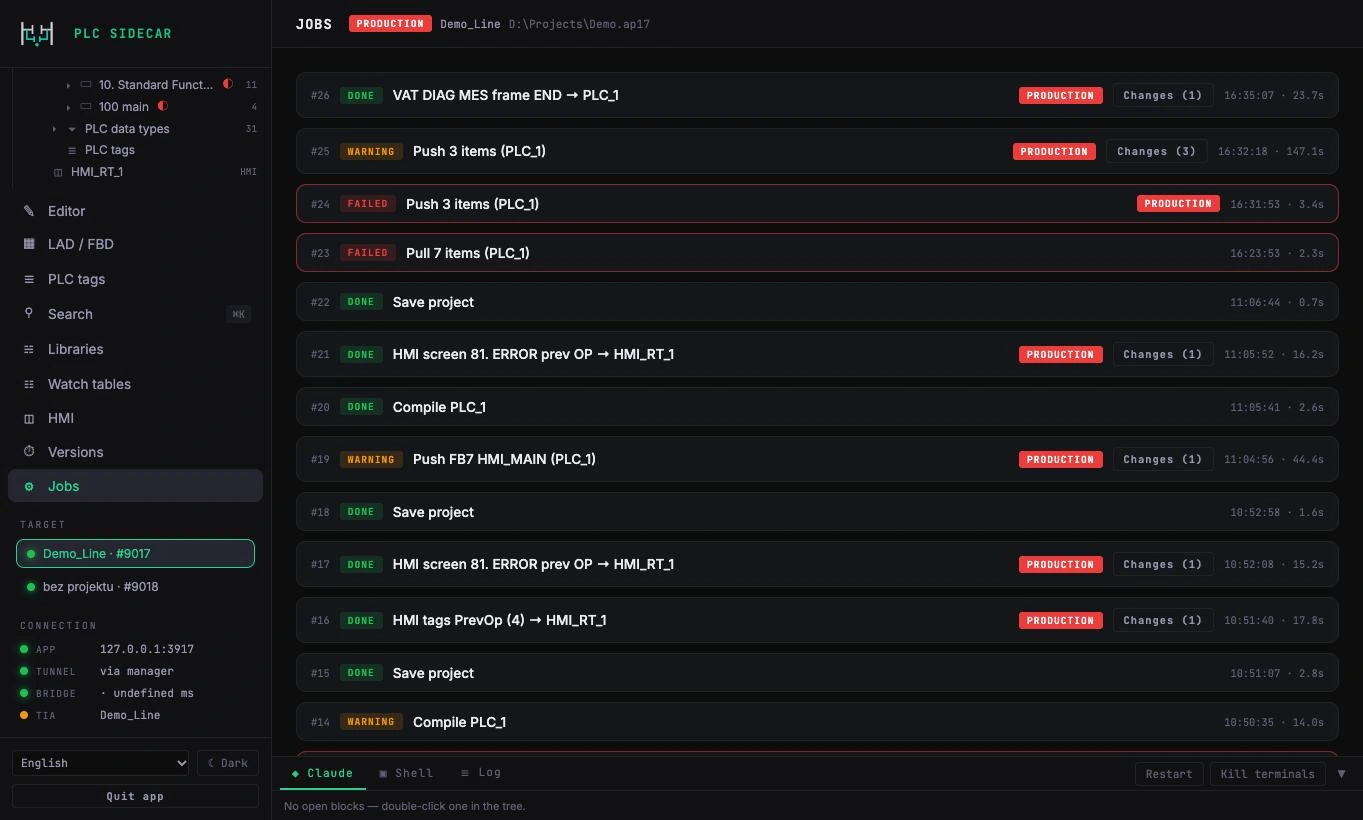
PLC Sidecar
Compile and save. Every time.

How a change travels.

PLC Sidecar touches the project only through the official Siemens interface TIA Openness. The download to the PLC is always done by a person.

Your workstationAIany model proposes the change
Your workstationPLC Sidecarversion, freshness check, review, approval
NetworkSSH tunnelencrypted, the token never travels
WindowsBridgeone process per TIA version, localhost only
SiemensTIA Opennessofficial API: export, import, compile
SiemensTIA Portalyour project, 0 errors; you download to the PLC
How it works in practice: the guide
Latest version

What's new

Version 0.5
All changes

The handlebars stay with you.

PLC Sidecar never downloads to the PLC. Going online with a running line stays your decision.

// Built by a PLC programmer, for PLC programmers.